Official EMCO distributor
CNC Machines
for Manufacturing, Training & Education

emco logo
Software Accessories Software

Easy2control

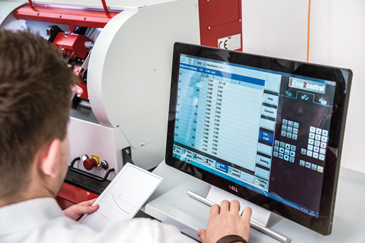
Easy2control extends the EMCO WinNC interchangeable control system by displaying control-specific machine keyboards and additional operating elements directly on screen. It can be used with EMCO training machines and simulation workstations.

When combined with a touchscreen monitor, buttons, switches and rotary controls can be operated directly on screen. Support for different keyboard configurations, customer-specific layouts and machine control panels provides a flexible operating system for CNC training.
easy2control featured image

Highlights

  • Virtual machine control panel
  • Optional extension for EMCO WinNC controls
  • On-screen display of control-specific machine keyboards
  • Touchscreen, mouse and keyboard operation
  • Alternative to a USB control keyboard
  • Quick switching between different CNC control systems
  • Machine, control and shortcut panels organised using tabs
  • Multiple keyboard layouts and configuration options
  • Customer-specific keyboards available on request
  • Suitable for machines and simulation workstations
  • Can be retrofitted to compatible systems

Functions

Virtual control keyboard

  • Displays the control-specific machine keyboard directly on screen
  • Includes the available button elements for supported WinNC controls
  • Activates the required buttons when the relevant WinNC control is installed

Switchable control panels

  • Machine, control and quick-access panels can be selected using tabs
  • Provides a clear overview of the required operating controls

Flexible operation

  • Buttons and rotary controls can be operated using a mouse
  • Controls can be operated directly on screen when using a Full HD touchscreen
  • Supports a wide range of keyboard layouts and configurations

Customer-specific configuration

  • Supports tailored screen layouts and customer-specific keyboards

Demo activation

  • Can be activated without a licence key when using the WinNC demo version
  • Activation is available during installation or through the EMConfig configuration tool

Versions

Version 2

  • Designed for EMCO Concept machine series 55, 60 and 105
  • Software-based control keyboard solution
  • Compatible with standard touchscreens
  • Easy2operate available as an option

Version 3

  • Designed for EMCO Concept machine series 260 and 460
  • New integrated control panel design
  • Industrial 22-inch touchscreen
  • Hardware-based machine keyboard solution

Options & Accessories

Easy2operate

  • Compact machine control panel required when using Easy2control on a Concept machine
  • Used alongside the Easy2control software and licence dongle

Machine control panel

  • Optional physical operating panel for machine control

DNC interface

  • Connects WinNC to a higher-level production, FMS or DNC host computer
  • Allows remote control of the CNC machine through a software protocol
  • Supports the remote control of doors, chucks, collets, sleeves and coolant systems
  • Displays the current machine status on the connected DNC computer

EMCO Win3D-View

  • Optional 3D simulation software for turning and milling
  • Realistically displays tools, blanks, clamping devices and machining processes
  • Checks programmed tool movements for potential collisions

EMCO WinNC

  • Interchangeable control system for training on common industrial CNC controls
  • Allows multiple control systems to be installed and taught using one machine

EMCO Concept machines

  • Modular CNC machines designed for professional training and production applications
  • Can be integrated into a CIM production network or equipped with training software and courseware

Licences

Homeschooling licence

  • Extension of the multiple licence for distance learning
  • Allows any number of students to install the programming software off-site
  • Valid for five years, covering more than one teaching cycle

Multiple licence

  • Designed for the external programming of CNC-controlled machine tools
  • Can be installed on an unlimited number of PC workstations or across a network within the registered institution

Single licence

  • External programming station for all EMCO Concept machines

Individual Easy2control licence

  • Available as an option for WinNC controls
  • Activated using a USB licence dongle

Applications

  • CNC control training
  • Machine-based control operation
  • Simulation workstation operation
  • Touchscreen CNC control
  • Virtual machine keyboard operation
  • Training on multiple industrial control systems
  • Customer-specific control panel configuration
  • Remote machine control using DNC
  • External NC programming
  • Distance learning

Software Specifications

  • Recommended screen resolution: 1920 x 1080 pixels
  • Aspect ratio: 16:9
  • Operation: Touchscreen, mouse or control keyboard
  • Configuration tool: EMConfig
  • Licence activation: USB dongle
  • Installation: Retrofittable to compatible systems

Supported WinNC Controls

  • Sinumerik Operate
  • Siemens 840D
  • Fanuc Series 31i
  • Heidenhain TNC 426/430
  • Heidenhain TNC 640
  • FAGOR

Machine Compatibility

  • EMCO Concept series 55
  • EMCO Concept series 60
  • EMCO Concept series 105
  • EMCO Concept series 260
  • EMCO Concept series 460

Display Options

  • Standard Full HD touchscreen support
  • 21.5-inch touchscreen support for Concept Turn 260 and 460
  • Industrial 22-inch touchscreen for Version 3