Official EMCO distributor
CNC Machines
for Manufacturing, Training & Education

emco logo
Software

EMCO Easy Cycle

EMCO Easy Cycle is part of the EMCO training strategy and is designed for selected conventional turning and milling machines, as well as EMCO Concept Turn and Concept Mill machines. No previous knowledge of ISO programming is required.

Interactive contour programming allows users to define workpiece outlines using linear and circular contour elements. Graphical support, machining cycles and visual guidance make CNC programming easier to learn and apply.
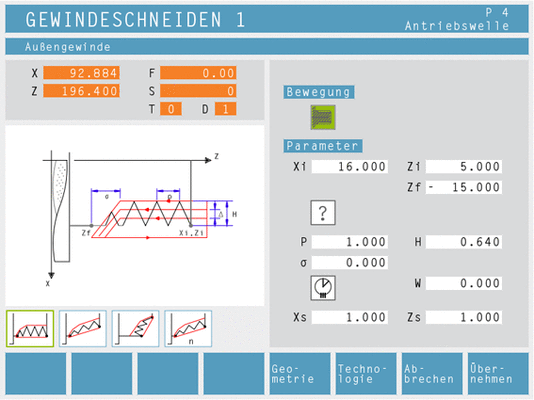
emco easy cycle featured image

Highlights

  • No previous ISO programming knowledge required
  • Interactive contour programming
  • Linear and circular contour elements
  • Horizontal softkey control
  • 2D graphical simulation with automatic zoom
  • 3D tool generator and tool database with 3D view
  • Contour editor with graphical support
  • Detailed error messages for drive problems and programming faults
  • Permanent storage of main programs, drilling templates and contours
  • Large NC program memory

Functions

Tool measurement

  • Tool offsets are determined by touching the reference workpiece

Workpiece program data transfer

  • Programs, contours, cycles and tool data can be stored and recalled through the control
  • Data can be transferred using a USB interface

Zero offset

  • The workpiece zero point can be set by touching the reference workpiece

Dry run

  • Helps identify and correct programming errors and potential collisions before machining begins

Preliminary block run

  • Allows NC code blocks and machining cycles to be skipped

Program editor

  • Integrated editor with supporting cycles and visual guidance for easier operation and programming

Contour processor with graphic simulation

  • Graphically displays the programmed workpiece contour during program creation

Diagnostics

  • Displays alarms, signals, software versions and customer information

Options & Accessories

Programmer’s workstation version

  • Includes 3D graphical simulation with automatic zoom

Applications

  • CNC programming training
  • Conventional turning machine programming
  • Conventional milling machine programming
  • Concept Turn machine programming
  • Concept Mill machine programming
  • Interactive contour programming
  • Linear and circular contour creation
  • Drilling pattern programming
  • 2D and 3D program simulation

Software Specifications

  • Control interface: Horizontal softkeys
  • Standard simulation: 2D graphical simulation with automatic zoom
  • Workstation simulation: 3D graphical simulation with automatic zoom
  • Programming tools: 3D tool generator and tool database with 3D view
  • Data transfer: USB interface
  • Operation: PC keyboard and mouse or compatible control keyboard
  • Program storage: Limited only by the available hard drive capacity

Machine Compatibility

  • Selected conventional turning machines
  • Selected conventional milling machines
  • EMCO Concept Turn 55, 60 and 105
  • EMCO Concept Mill 55, 60 and 105
  • EMCOMAT FB-450 L
  • EMCOMAT FB-600 L

Languages

  • English
  • German
  • French
  • Spanish
  • Italian
  • Dutch
  • Czech
  • Polish
  • Russian
  • Romanian