The Robotic Interface connects an EMCO Concept machine to an FMS or CIM system. Using the inputs and outputs of an optional hardware module, key machine functions can be controlled automatically.
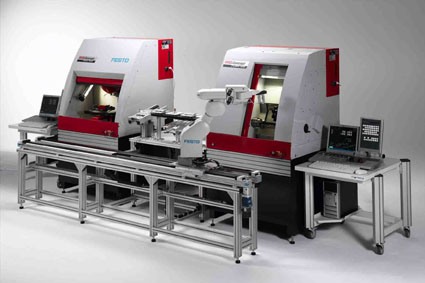
Highlights & Features
Highlights
Start and stop programs
Open and close the machine door
Clamp and retract the quill
Open and close the clamping device
Activate feed hold
Automate key EMCO Concept machine functions
Equipment, Options & Controls
Options & Accessories
Hardware interface module
Optional input and output module for automating machine functions
Connects the EMCO Concept machine to an FMS or CIM system
Applications & Workpieces
Applications
Robotic machine integration
Flexible manufacturing systems
Computer-integrated manufacturing systems
Automated machine loading and operation
Automated production cells
Machine function control
Technical Specifications
Interface Specifications
Interface type: Robotic hardware interface
Machine compatibility: EMCO Concept machines
System compatibility: FMS and CIM systems
Communication method: Hardware inputs and outputs
Controlled functions: Program operation, machine door, quill, clamping device and feed hold